Close

Before you go

You are about to leave flagstar.com and access a site administered by a third-party. The site you are going to may have different privacy and security policies. We recommend that you review these policies on the linked site. If you choose to proceed, a new browser window will open. To return to flagstar.com, close the new browser window.

Flagstar Mobile App and Debit Card

CHECKING ACCOUNTS

Personal checking accounts

Find the checking account that fits your lifestyle. Choose from everyday and interest-earning checking options—all with 24/7 mobile banking, a Visa® Debit Card1, and access to over 56,000 ATMs nationwide2. Open an online checking account in minutes.


NO MINIMUM BALANCE

Flagstar Ready Checking

Best for simple, everyday banking with no balance requirements

  • No minimum balance requirement – open and maintain your account with flexibility.
  • 24/7 account management – monitor spending, set Debit Card Controls, and get real-time Account Alerts.
  • Convenient ways to pay – Send and receive money in minutes with Zelle® and pay bills online for free.
     

Monthly fee: $10, $5, or $0

Avoid the fee

EARNS INTEREST

Flagstar Elite Checking

Best for earning interest with added premium perks

  • Earn interest on your checking balance – grow your money while you manage everyday spending.
  • Premium CD rates3 – unlock higher interest rates when you open a CD with your Elite Checking relationship.
  • Exclusive checking benefits – Enjoy higher limits on transfers and mobile deposits,4 as well as a dedicated client service line.

Monthly fee: $15 or $0

Avoid the fee
hand clicking a button

Started an application? Finish application.

Compare our checking accounts side-by-side

Feature

Ready Checking

Elite Checking

Minimum opening deposit

$50

$50

Monthly fee

$10

$15

Fee waiver options

Blue checkmark
Blue checkmark

Overdraft options

Blue checkmark
Blue checkmark

Flagstar Visa® Debit Card1

Blue checkmark
Blue checkmark

56,000+ Free ATMs2

Blue checkmark
Blue checkmark

FDIC-insured5

Blue checkmark
Blue checkmark

Earns interest

Blue checkmark

Premium CD rates3

Blue checkmark

Higher transfer limits4

Blue checkmark

Free annual checks

Blue checkmark

Dedicated service line

Blue checkmark

What features are included in personal checking accounts?

MOBILE APP

Bank securely anytime, anywhere

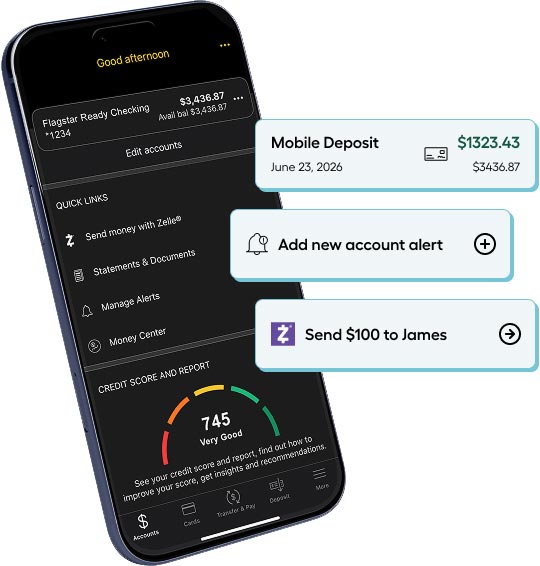
Bank securely from anywhere with our highly rated Mobile App. Safely pay bills, send money with Zelle,® deposit checks,6 and manage all your accounts.7

4.7 icon of paper bill
Apple App Store as of 7/1/2026

visit the following URL to download our app from the apple store: https://apps.apple.com/us/app/flagstar-mobile-banking/id972805390 or Visit the following URL to download our app the Android URL https://play.google.com/store/apps/details?id=com.mynycb.nycb&hl=en_US&gl=US

Scan this code with your phone’s camera to download the Flagstar Mobile App from the Apple App Store or Google Play Store.

Images of mobile phone with features

FAQs for personal checking accounts

A checking account is a bank account for everyday spending and transactions like paying bills, sending money to family and friends, using a debit card, and receiving paychecks through direct deposit. Most checking accounts include online and mobile banking.


Visit our Understanding Checking Accounts page to learn more about how checking accounts work. 


Flagstar checking accounts include:

FDIC insurance protects your money (up to $250,000) in insured U.S. banks. It covers accounts like checking, savings, and CDs.


Flagstar is an FDIC-insured bank, which means customer deposits are insured up to at least $250,000 per depositor for each deposit category.5

Most bank's require a completed application, completed in a branch or online, that includes personal information about yourself. This often includes:

  • Valid ID 
  • Social Security number 
  • Home address
  • Contact information 
  • Initial deposit


When you open a Flagstar Checking Account online or at a branch, please have the following information available:

  • Name
  • Address
  • Mobile phone number (to verify your identity if you open an account online)
  • Date of birth
  • Social Security number or other identification number
  • Valid identification (such as driver's license, state ID, or passport)


There are two common fees that bank's may charge related to checking accounts. They are monthly account fees and/or ATM fees.


A monthly account fee is a fee banks may apply to your account each month. It can often be waived by meeting certain requirements, for example, maintaining a specific balance or enrolling in services such as e-statements.


An ATM fee is a fee for using an ATM outside your bank’s network. Either the owner of the ATM, or your bank, or both, may charge a fee.


Here is how Flagstar handles monthly account fees on our checking accounts:

  • Flagstar Ready Checking: $10 monthly service fee reduced to $5 with any ONE of the following or fully waived with any TWO of the following: Enroll in electronic statements; $500 or more in total direct deposits (ACH credits) each statement cycle; $1,000 or more average balance each statement cycle; primary account holder is 24 years old or younger8
  • Flagstar Elite Checking: $15 monthly service charge, which you can avoid by maintaining a $25,000 combined monthly average balance in your Flagstar personal deposit accounts. Your linked account(s) must be enrolled in the Flagstar Elite Relationship Program.
  • Flagstar One Checking: $5 monthly service charge


Flagstar customers have free access to 56,000+ ATMs in the AllPoint and Presto global networks2, as well as over 300 branches.

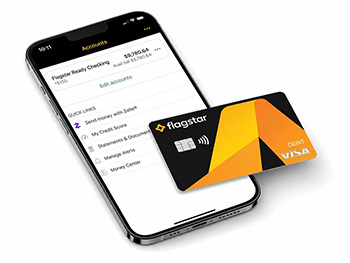
Most checking accounts include online and mobile banking.  Common features within online and mobile banking include the ability to check balances, transfer money, pay people or bills online, and deposit checks using a mobile device.


Flagstar checking accounts include both Online Banking and a Mobile App. Features include:

  • Track account activity
  • Sending money with Zelle®
  • Online Bill Pay
  • Internal and external transfers
  • Account Alerts
  • Debit Card Controls
  • Money Center
  • Round Up with Flagstar®
  • My Credit Score
  • Mobile check deposit (Mobile App only)6

A debit card is connected to your checking account and allows you to make purchases or withdraw cash directly from your account. Unlike a credit card, it only uses the money you already have.


All Flagstar checking accounts come with a Flagstar Visa® Debit Card1.

1This debit card is issued by Flagstar Bank pursuant to a license from Visa U.S.A. Inc.

2Currency conversion fee may apply to transactions outside the U.S.

3 Excludes 10-Day CDs. Offer available to customers enrolled in Flagstar Elite Relationship Program only.

4Higher limits apply within 30 calendar days if you are an existing customer or 60 calendar days if you are a new customer.

5Visit fdic.gov for more information about FDIC insurance coverage.

6Not all devices supported. Available for eligible personal and business checking and savings account customers only. Must be an active mobile banking user. Must be a customer for a minimum of two business days. Accounts must be in good standing.

7Apple and the Apple logo are trademarks of Apple Inc., registered in the U.S. and other countries. App Store is a service mark of Apple Inc. Android, Google Play, and the Google Play logo are trademarks of Google Inc.
8When the primary account owner reaches 25 years old, age can no longer be used to avoid the monthly service fee.